Learn More
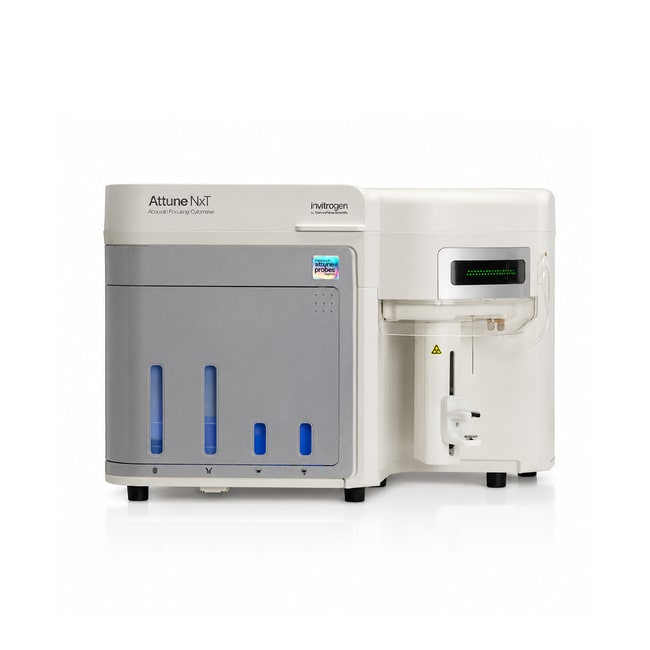
Attune™ NxT Flow Cytometer, blue/yellow
Description
- The 2019 Attune NxT Flow Cytometer has expanded functionalities to drive your research forward. Designed and developed to remove common barriers associated with flow cytometry, the evolutionary capabilities of the Attune NxT flow cytometer offer adaptable optical configuration options so you can get the most out of your multicolor analysis.
- Free Attune NxT software with researcher-inspired upgrades
- New green laser option for expanded utility and fluorochrome options
- Simple push-button sample recovery function
- The innovative combination of acoustic focusing technology coupled with traditional hydrodynamic focusing results in acquisition speeds up to 10X faster than other flow cytometers. This technology reduces the time needed to obtain results.
- True 35,000 event/sec (+10% coincidence rates)
- Maximum electronic speed of 65,000 events/sec
- Analyze small or limited samples faster than ever
- Efficiently run traditionally long assays
- The Attune NxT flow cytometer is ideal for immunophenotyping and signaling studies, cell cycle analysis, detection of rare events, stem cell analysis, cancer and apoptosis studies, microbiological assays, and more.
- The instrument’s modular design provides the flexibility to meet future capability needs with a variety of upgrade options. Purchase what you need now and easily upgrade later. The small footprint of the instrument requires minimal bench space, even allowing use in a cell culture hood.
- Flexibility—1 to 4 lasers, 14 colors, and 16 parameters
- Field upgradeable—choose to add additional lasers when you decide
- Customizable band pass filters for expanded fluorochrome choices
- The Attune NxT Flow Cytometer easily runs most samples including cardiomyocytes. The system is designed with a clog-resistant syringe-driven system to push the sample with a force of up to 75 psi.
- Flexibility in sample concentrations and sample types
- Elimination of time-consuming concentration steps with No-Wash, No-Lyse Filter Kit
- Analysis of dilute samples, including CSF, stem cells, mouse bone marrow, mouse blood, and thin needle aspirates
- Acquisition of a high volume of samples in minimal time

Specifications
Specifications
| Content And Storage | Attune™ Acoustic Focusing Cytometer Minitower Windows™ 7 64-bit computer with 23-inch flat panel monitor Power cord with adapters USB cable User manual document CD Attune™ NxT software Quick reference card 1 vial of Attune™ Performance Tracking Beads 1 bottle of Attune™ Wash Solution 1 bottle of Attune™ 1X Shutdown Solution Attune™ Focusing Fluid (10 L) |
| Format | Tube(s) |
| Laser Features | Blue Excitation Laser (488 nm), Yellow Laser (561 nm) |
| Product Line | Attune |
| For Use With (Equipment) | Attune™ NxT Acoustic Focusing Cytometer |
| Shipping Condition | Room Temperature |
| Quantity | 1 each |
Frequently Asked Questions (FAQs)
Step 2 allows for antibodies you have already purchased or are from a vendor outside Thermo Fisher Scientific. If you are undecided about which format you want for something, you can add the antigen name in the "Antibodies you need" section and then choose a placeholder fluorochrome in the following step. Both will help you keep track of channels that are reserved for reagents that you do not plan to buy from Thermo Fisher Scientific.
There are both PDF (printable) and CSV (spreadsheet) exports available in the summary step for you to take away for reference and ordering purposes.
Yes, you can define a new cytometer using the "Enter your cytometer manually" link below the cytometer dropdown menu.
Select a cytometer from the dropdown menu and then select the "Edit cytometer settings" link to modify the configuration as needed.
Each dot indicates a different fluorochrome that Thermo Fisher Scientific has available in each channel of the cytometer you have chosen.
For Research Use Only. Not for use in diagnostic procedures.
By clicking Submit, you acknowledge that you may be contacted by Fisher Scientific in regards to the feedback you have provided in this form. We will not share your information for any other purposes. All contact information provided shall also be maintained in accordance with our Privacy Policy.